
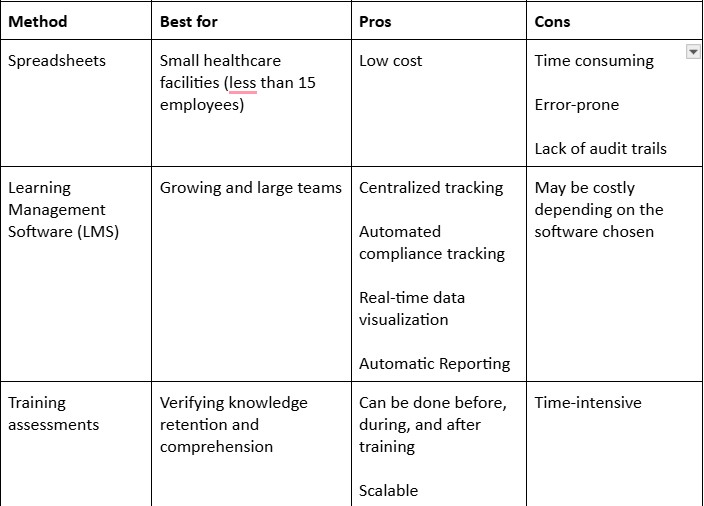
Spreadsheets, learning management systems, and training assessments are among the best ways to track your employee training completion rates. The method you use depends on your company’s budget, your team size, and compliance teams. For healthcare facilities, automated software systems are the best in ensuring compliance with state and federal regulations.
Key Takeaways
- Tracking employee training completion in healthcare improves regulatory compliance, demonstrates training ROI, and improves manager and employee accountability
- Using training tracking software saves you time and money, and makes compliance tracking easier
- Key metrics when tracking training include drop-off rates, time-to-completion, pass rates, and course enrolment rates
Why is Tracking Employee Training Completion Important?
Course completion tracking is the process of monitoring, managing, and recording employees' progress through your training materials. It facilitates compliance with federal, state, and internal regulations by tracking employee training records and ensuring each employee completes mandatory compliance training courses.
Tracking training progress improves employee accountability. Training trackers allow you to monitor each employee's progress through an assigned course. This way, you can send reminders for unfinished courses.
It also enhances employee engagement and performance evaluation. The progress employees make on completing training courses lets you know how engaging your training content is and the priority employees have for continuous learning.
This means you have the insights to help you optimize your training programs to make them more engaging.
During onboarding, tracking course completion rates helps you initiate conversations about a new hire's professional development and any issues they may face during training.
For example, staff with heavy workloads may be unable to complete training. This means your facility has to find ways to create time for your employees to learn or adopt strategies such as bite-sized learning.
Such approaches allow your employees to learn in short bursts of time and meet completion deadlines for mandatory training programs.
Keeping track of employee progress on training helps you identify and address existing skill and knowledge gaps. When completion data is used alongside performance data, it reveals how well the training process meets the organization's needs.
For example, if a department has high completion but low performance, it means the training does not address the core learning needs.
Similarly, if your employees complete their training, score high on assessment tests, but still perform poorly, it may point to a problem in applying the skills and knowledge to their job. This may call for mentorship or coaching to guide the employees.
What are the Best Ways of Tracking Employee Training Progress?
The main goals of tracking employee progress are to ensure regulatory compliance and measure the ROI of your training efforts.
The best way to track employee training progress depends on the size of your healthcare facility, the number of employees you're training, and the metrics you want to track. Here's a breakdown of the popular methods:
Manual Tracking Using Spreadsheets
Manual tracking is a low-cost way to measure the progress your employees have made in completing various courses. It involves using spreadsheet programs such as Excel or Google Sheets to monitor progress.
Spreadsheets work well for small healthcare facilities with few employees to train and fewer courses to track. Here's how to use a spreadsheet as an employee training tracker:
- Create a spreadsheet with columns for employee name, course, training period, completion progress, and certifications.
- Use data validation on your tracker for accuracy and consistency
- Update your tracker weekly to monitor progress and ensure up-to-date data
- Incorporate compliance and certification tracking to help you identify employees who need recertification
Tracking with Learning Management Systems
Employee training management software, such as ops.work, includes features to track staff progress across courses. Some of these features include:
- Automated reminders are usually sent before the deadline. These reminders can be sent to L&D teams and employees, depending on how close the completion deadline is.
- Certification tracking management, including automatic reassignment of mandatory compliance courses to ensure ongoing compliance
- Real-time tracking to ensure you have the latest data on which employee has completed what training
- Custom report generation, which allows you to personalize your completion reports for various stakeholders
- Role-based course assignment, which ensures all your staff are assigned the right courses. This helps you track department-specific training metrics and progress. The result is better decision-making to improve your employee development programs.
- Version control, especially for compliance courses which allows you to maintain an audit trail. This ensures that you can track which courses you offered, when they were updated, and which employees completed their training.
Training tracking tools such as ops.work let you visualize your training data at a glance without customizable dashboards and LMS reports.
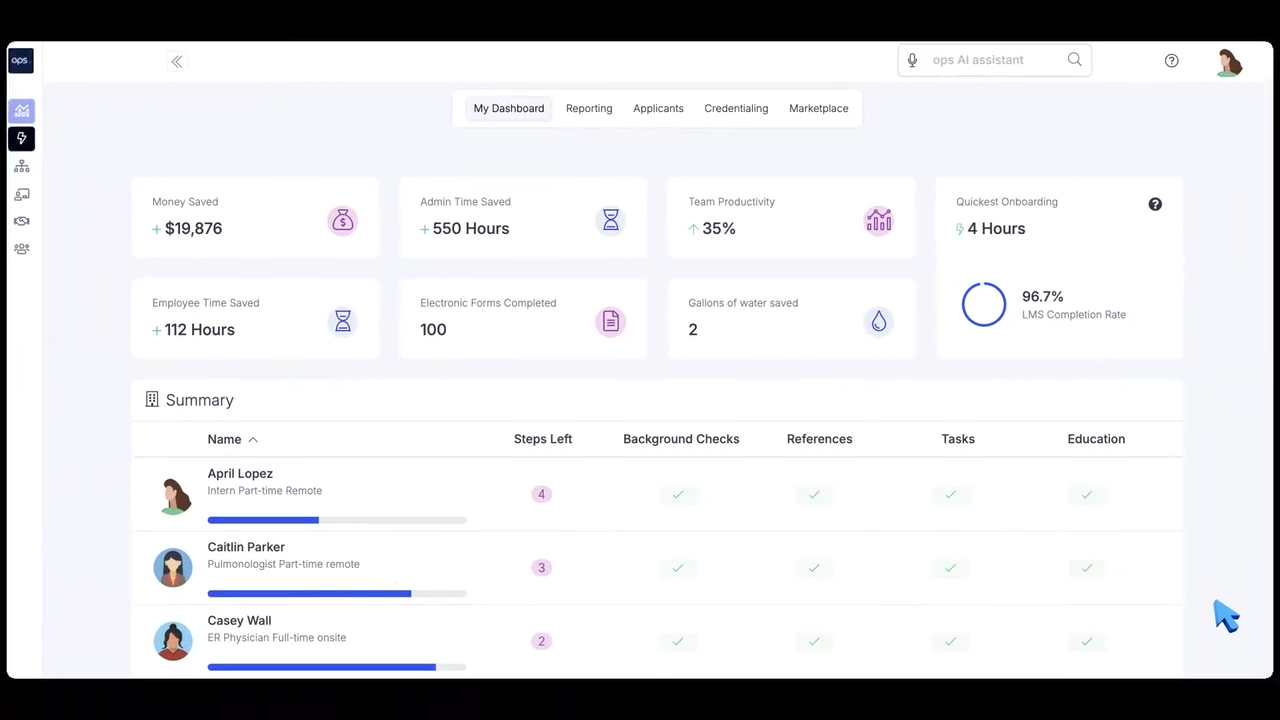
It also sends automated reminders for upcoming training, ensuring your employees stay on track in building the skills and knowledge required to succeed.
Training Assessments
Getting through a course from start to finish doesn't provide sufficient data on its impact on employee performance and productivity. To fill this gap, you must track the ongoing impact of the course throughout the learning period.
You can do this through assessments to measure knowledge retention. Common assessment methods include quizzes, self-assessments, and practical assessments.
You can conduct these assessments during the course, immediately after training, or months after to measure long-term retention. Long-term assessments inform future L&D efforts, such as providing refresher courses to ensure employees retain critical knowledge.
Which Training Metrics Should You Track?
Wondering how to track employee training effectively? Then, you should start by identifying the metrics that provide you with critical employee training data. These include:
- Enrolment rates, which tell you the number of employees who have signed up for a particular course. For mandatory courses, the enrolment rate should be 100%. Low enrolment rates may indicate the need for a better marketing or communication strategy.
- Time-to-completion measures the speed at which employees complete a course. This may be influenced by the length and complexity of the material.
- Drop-off rates indicate the number of employees who started a course but did not complete it. This metric can indicate issues with the training, such as unengaging content.
- Pass rates on assessment tests help your facility measure the knowledge retained during training. It can tell you about the complexity of your training based on how well your employees retain the material.
- Completion rates let you know the number of employees who completed the training offered. High completion rates indicate engaging content, while low rates may indicate the need to restructure your content to make it more engaging.
What are the Benefits of Using Employee Training Tracking Software to Track Course Completion?
Training tracking software helps your facility track progress toward completing various corporate training materials. It allows you to track various metrics that measure the effectiveness of your efforts in meeting organizational training needs.
Such tracking systems reduce the time spent on training by automating manual tasks such as assigning courses, tracking progress, sending reminders when deadlines are approaching, and generating reports.
Automatic reminders ensure that your employees know when they need to meet certain training goals. These reminders are critical for ensuring employees complete required training on time and keep you facility compliant.
These systems let you customize training reports to different metrics and stakeholders, enabling each to draw relevant insights from the same training data. This provides a more holistic approach to improving the effectiveness of the organization's training programs.
Using training management systems creates centralized training records. This makes it easy for the L&D team to manage training from across departments on a single dashboard. This makes compliance and training optimization easier.
How to Choose the Best Employee Training Tracking Software
Choosing the right training software for progress tracking depends on your organizational needs. These needs inform the features you should prioritize, your budget, and compliance requirements. Here are a few tips to help you choose the best training system:
- Identify the business needs you want to address by adopting a training tracker. These needs include improving compliance, creating tailored training modules, and measuring the effectiveness of your training programs.
- Choose a system that supports integrations with other systems and automatically syncs back to employee records. This ensures you have an updated and complete overview of your training in one place.
- Choose a scalable training system that can grow with your future training needs.
- Look for an easy-to-use system. Such a tool saves time and reduces the resistance by employees and administrators to adopting it. This ease of use is especially important in healthcare settings where staff are already operating on heavy schedules with little time to learn new software.
- Choose a system with comprehensive reporting and automated tracking to make it easier to measure how well employee training works in your facility.
- Choose a tool with a reliable customer support service to ensure you have accessible help when your system doesn't work as intended.
Ops.work is a good example of a software used to track online training for compliance and completion. It comes with a robust set of features, including ready-to-use employee training templates, real-time progress tracking, and comprehensive analytics and reporting.
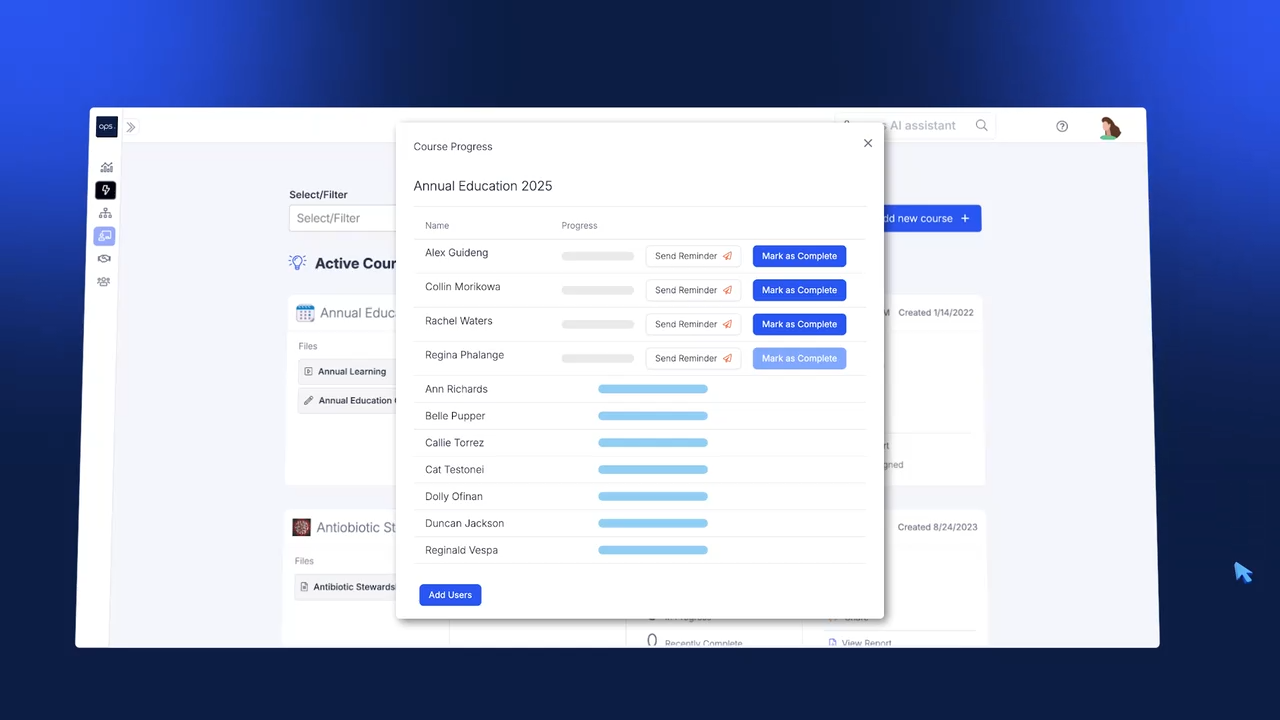
It enables seamless integration with various business systems, streamlining access to and completeness of training records. It is also built for scalability, which accommodates your growing employee development needs. Explore our plans to choose one that's best suited for your facility.
Best Practices for Tracking the Completion Rates of Employee Training Programs
Completion data, when used effectively, can go a long way in helping your facility improve its training for employee productivity and engagement. It goes beyond counting the number of staff who have finished a particular course to developing systems and processes that optimize your training initiatives.
You can learn how to track employee training for better business outcomes with these tips:
Clarify What Completion Means for Your Facility
Start by defining the training requirements that every employee must meet before they can be considered to have finished a course. These requirements include:
- Finishing all training modules and materials
- Completing relevant assessments for each course
- Attaining a passing grade on each assessment
- Demonstrating competence either in simulated environments or in practical on-the-job demonstrations
- Attendance records for participating in in-person training and e-learning sessions
For courses such as compliance and safety training, certification may also be a criteria of determining completion. These certifications may expire over time, requiring employees to attend refresher training sessions.
Use a Centralized Learning Management System
Using a centralized LMS is the best tracking method as it allows you to monitor employee training without the limitations of data silos. A centralized system offers additional capabilities like:
- Real-time data tracking and analytics
- Uniformity in the data accessible to various stakeholders
- In-built segmentation of training data by role, department, and location makes it easier to generate reports and track emerging trends.
Segment Your Data
Segmenting your completion data helps you contextualize the people who completed your learning courses. Group your data by role, department, and location to help you gather specific insights and develop the right response.
You can further segment your data based on time, for example, the last year, to measure the improvements you've made through training.
Combine Completion Metrics with Employee Performance and Engagement Metrics
Although completion metrics can tell you a lot about the uptake of your learning modules, they do not paint a complete picture.
Combining them with other metrics provides a more detailed picture of the impact of your workforce development efforts. Some of the metrics to track alongside your completion metrics include:
- Job performance
- Employee engagement
- Time-to-productivity (for new hires)
Track Training Timelines
Each course you offer should have an estimated duration within which employees should complete it. The average time an employee takes to complete a course can provide insights into:
- How your workload affects employees' ability to complete training (heavy workloads may result in employees completing training after the deadline)
- The support systems available in your facility to encourage continuous learning
- The complexity of your training material (material that's too complex takes longer to complete)
- How engaging your training content is (employees complete engaging training faster. Rushed completion might also suggest poor knowledge retention rates.)
Conclusion
Tracking which employees completed what training helps you measure and optimize the ROI of your talent development effort. Tools such as ops.work provide the features that help you track training progress and draw actionable insights from this data. Try our free plan to track your skill development efforts.
References
Urbancová, H., Vrabcová, P., Hudáková, M., & Petrů, G. J. (2021). Effective Training Evaluation: The Role of Factors Influencing the Evaluation of Effectiveness of Employee Training and Development. Sustainability, 13(5), 2721. https://doi.org/10.3390/su13052721
Noe, Raymond A. Employee Training and Development. 5th ed., New York, McGraw-Hill Irwin, 2010.
Frequently Asked Questions
Tracking completion rates improves ROI by helping organizations identify which course material employees engage with and fix problems before they escalate.
Common challenges in tracking learning completion rates include inaccuracies caused by manual processes and data silos, leading to incomplete and inconsistent data. You can avoid these challenges through automated training progress trackers. Such trackers should integrate with various business systems for 360-degree visibility into the impact of your training efforts.
The 70-20-10 rule is a learning model which suggests that 70% of learning comes from hands-on experience, 20% from mentorship, and 10% from formal training.
The levels of training evaluation describe the models used to measure the impact of training on employee development and business goals. They include:
- Reaction - how engaging the training is
- Learning - the knowledge, skills, and attitudes gained from the training
- Behavior - How employees apply their skills on the job
- Results - the outcomes of training on business goals, productivity, and performance