
Onboarding software automates workflows, streamlining tasks such as credentialing, task management, and document management. Automation reduces errors, standardizes the onboarding process, and improves operational efficiency.
Key Takeaways
- Workflow automation improves efficiency, accuracy, and provides a positive onboarding experience for new hires
- Workflow automation should be a gradual process when moving from manual systems to reduce errors
- Creating an onboarding workflow involves listing all onboarding tasks, their sequence, dependencies, and boundaries, then feeding these into your automation system.
Manual onboarding is an intensive, time-consuming process, especially in healthcare, where HR teams must oversee multiple processes. These processes include credentialing, orientation, mandatory and role-based training, and other administrative tasks. Workflow automation streamlines the process. This makes it easy for HR and other teams to enhance the experience for new hires, improve employee engagement, and improve overall employee satisfaction.
What is Onboarding Workflow Automation?
Workflow automation involves using onboarding software to create a series of automated steps to make your onboarding process efficient and consistent. Automated workflows have several elements that facilitate their success:
Triggers and work items (Actions)
A trigger in the automation process is an activity or event that initiates a workflow. Without a trigger, your workflow is simply a set of rules. Once a trigger occurs, the system automatically creates a work item.
In onboarding, adding a new employee can trigger your preboarding workflow to send a welcome packet, request credentialing documents, send documents for signing, or task IT with creating work accounts for your new hire.
Conditions
Conditions are the predetermined rules or logic that define the path each task follows. These conditions follow an if/then criteria to determine the next steps.
In a preboarding workflow, for example, conditions might look like:
- If a new hire submits all the required documents, then alert the human resources team to start the credentialing process
- If the new employee hasn't submitted the required document by a certain date, then the software sends them an automated reminder
Dependencies
Workflow dependencies define the correct sequence of tasks. For healthcare facilities, clearly outlined dependencies facilitate compliance with internal policies and regulatory requirements.
In onboarding, for example, the IT department cannot provide access to email accounts until the new employee's information is captured in the HRIS.
Similarly, the payroll department cannot set up compensation and employee benefits until an employee has signed their offer letter and submitted the required documents, such as filled W-4 forms.
What are the Benefits of Employee Onboarding Automation?
Efficiency is a major reason healthcare facilities automate processes like onboarding. An onboarding tool such as ops.work streamlines time-consuming tasks, like background checks, reducing the time spent on manual verifications.
Automation ensures you can run many onboarding tasks concurrently, while maintaining visibility throughout the onboarding process.
Creating workflows to automate employee onboarding contributes to a positive onboarding experience for new hires. According to Gallup, companies with a positive employee onboarding experience have higher employee retention rates.
Through automation, you can create a consistent new hire experience that ensures every new hire feels welcome and appreciated. It also provides them with the support they need to become productive team members.
Using automation to streamline the onboarding journey speeds up onboarding. Your teams can save time by eliminating inefficient manual processes. Automating your workflows improves resource allocation and reduces errors, lowering the cost of your onboarding efforts.
Compliance is another benefit of automating your processes. Healthcare is a highly regulated industry; therefore, clinical facilities standardize their onboarding programs and other business processes to comply.
Automating these standardized processes streamlines compliance by requiring each new hire to fulfill conditions and rules before they are ready to handle patients.
How to Create an Automated Onboarding Workflow
Creating workflows is an important component of onboarding automation implementation. It involves turning the repeatable onboarding steps into logical sequences. Ops.work is a comprehensive tool that allows you to streamline your onboarding operations and customize process flows. Try our free plan to create standardized onboarding procedures.
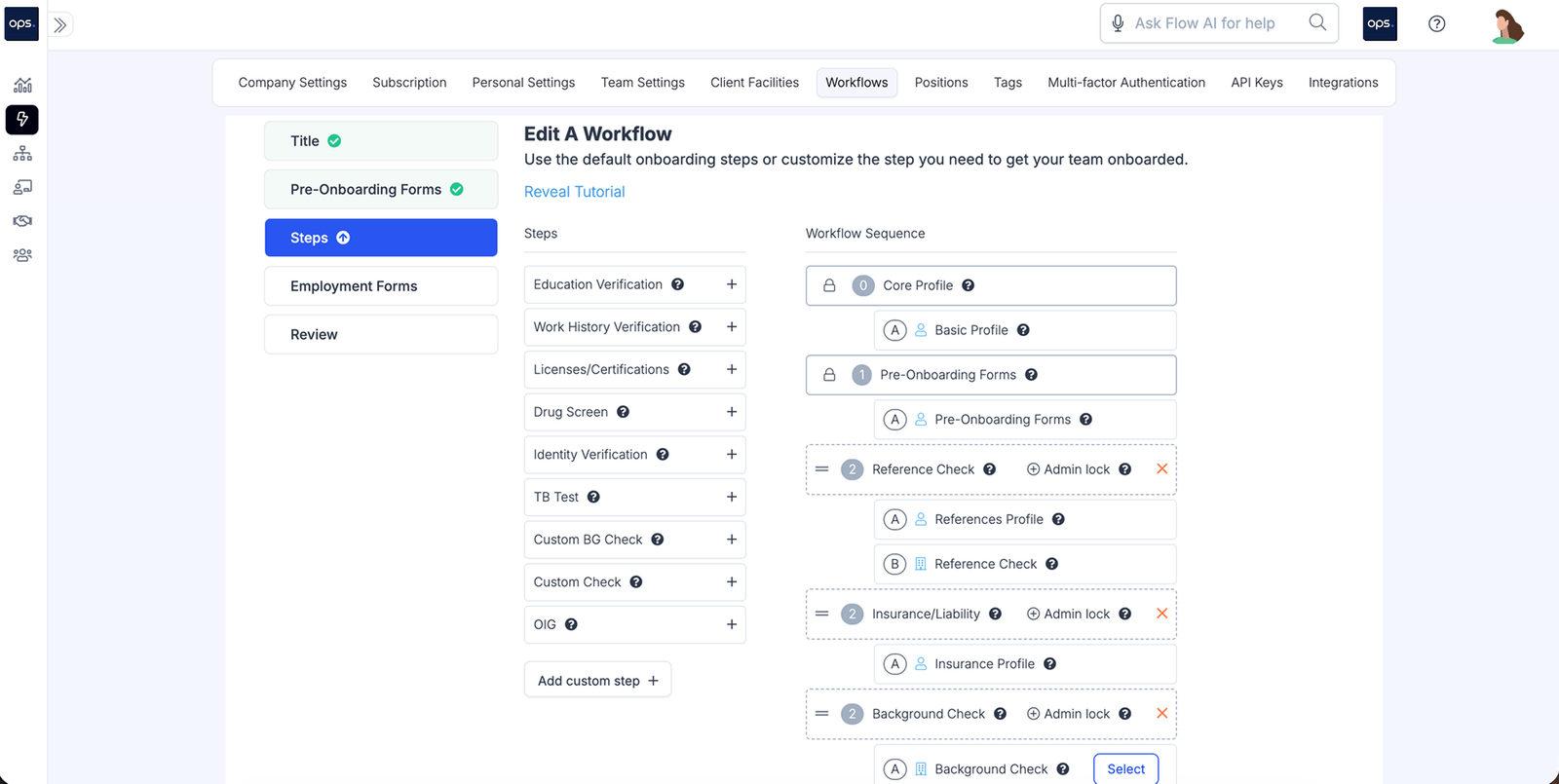
Here are the steps to follow for an effective employee onboarding automation process:
Choose the Right Automation System
Successful process automation begins with the right system. A good workflow solution should have the following features:
- Easy to use by both administrators and new hires
- Have customization features that allow you to personalize onboarding processes to your business goals and functions
- Flexibility and scalability, including the ability to create and edit a variety of process flows and onboard multiple employees across various locations
- The solution should support integrations with other business systems, including HRIS, payroll, and IT systems. A good system should also integrate with collaboration and communication tools to ensure that teams can coordinate to ensure an effective onboarding process
- Your software should include reporting and analytics capabilities to help you monitor and optimize your efforts to automate onboarding
- Your onboarding and HR automation solution should be secure. Since a lot of company and employee data passes through the system, it should protect their sensitive information. Some security features to look for include role-based provisioning, multi-factor authentication, and adherence to cybersecurity standards such as SOC 2.
Create a List of Every Onboarding Task
Evaluate your current process to identify every onboarding step and related tasks. Here are some tasks at various stages of the onboarding process:
- Preboarding (welcome emails, document submissions, background checks, OIG exclusions monitoring, reference checks)
- Orientation (company tour, introduction to team members, signing policy acknowledgements, payroll setup)
- Onboarding training (training planning, assessments, feedback sessions)
- Feedback and performance management (long-term career planning, onboarding experience survey)
Involve key stakeholders involved in onboarding to ensure you have a full overview of all the tasks in the entire onboarding program. Some of the teams involved in onboarding include HR, admin, IT, marketing, and L&D.
Once you have a checklist of all tasks and the teams that perform them, identify the workflows in which they fit. You can divide your onboarding program into the following processes:
- Credentialing
- Orientation
- Administrative and HR onboarding
- IT account and systems provisioning
- Mandatory and role-based training
- Team integration (30-60-90 day plans)
Not all tasks in onboarding may be automated unless they:
- Are high volume
- Time-sensitive
- Involve multiple people or teams
- Have a significant impact on other business processes. For example, credentialing determines whether a provider can treat and bill patients at a facility
- Require an audit trail to meet regulatory or operational standards
Identify the Components and Boundaries of Your Workflows
A good process flow must have a well-defined start and end point. Each process begins with a trigger event and ends with an output. In between these points are other components such as:
- Actors, which include people, systems, and tools. They influence tasks in different ways.
- Triggers are the events that start a process. These can be actions, conditional rules, or decisions. For example, an employee accepting an offer during the hiring process may trigger the preboarding process.
- Work or tasks are the manual or automated activities or steps needed to achieve a desired output
- Information includes the data a process requires to move forward.
- Decision nodes are points in a business process where a system or individual must choose among multiple potential paths. Each decision node must include conditional logic (rules following the if/then criteria), binary and multi-way decision-making, and outcomes.
- Outputs are the outcomes or end results of a workflow. For example, the outcome of the training process is an employee completing a course or being productive in their role
Determine Task Sequences
Task sequencing lets you determine the order in which your teams complete tasks during employee onboarding. Whether in automated or traditional onboarding, task sequences highlight task dependencies.
When dependencies are clear, you have fewer bottlenecks thus more efficient business processes as you can complete certain tasks concurrently.
Set the rules, conditions, and decisions throughout the entire employee onboarding process to ensure your system can successfully route tasks to the right employee at the right time.
Test and Deploy the Workflow
Once created, run your workflow to check for missing steps, bottlenecks, and errors. Initiate a trigger task automatically or manually and check how the system handles the task to completion.
Test different conditions and decision nodes to ensure that the process is streamlined and error-free.
Fix any errors before officially deploying the workflow to automate new hire onboarding.
Monitor and Optimize
Monitoring and optimizing your workflows is an ongoing process that ensures new hires receive a consistent onboarding experience. Here are some of the methods you can use to identify inefficiencies and opportunities to improve your onboarding and HR processes:
- Create a flowchart of all tasks your HR staff need to complete to onboard new employees
- Map the relationships between tasks, including how they may change when you introduce new job roles, technology, or evolving regulatory requirements
- Track various KPIs such as cycle times, error rates, and resource consumption to test the efficiency of your processes and areas for improvement
- Develop an action plan to optimize your processes
What are the Best Practices When Automating Your Employee Onboarding Process?
While automation helps improve onboarding, you must follow best practices to maximize ROI from your efforts. Here are tips to improve the effectiveness of your automated processes:
- Scale gradually to minimize risks, errors, and ensure onboarding success without compromising the new employee experience.
- Breakdown tasks in your flows to the finest units. For example, in an onboarding training workflow, the main tasks may include training planning. Under this task, you can have subtasks such as needs assessment and budget allocation. These tasks can be divided into even smaller subtasks. For instance, budget allocation can include tasks such as listing cost categories, creating budget summaries, and submitting for approval.
- Define roles and responsibilities clearly to ensure your automation platform delegates the right tasks to the right people
- Establish clear dependencies to reduce delays and eliminate bottlenecks
- Create flexible and scalable workflows that can grow with your team and organization without reducing efficiency
- Ensure your workflow adheres to internal and regulatory standards to maintain compliance. Maintain an audit trail throughout each workflow.
- Combine the automation capabilities of onboarding systems with human interventions. Using software tools for your processes should not replace human input. This ensures you can identify bottlenecks and enhance the employee experience during onboarding and beyond.
Conclusion
Ops.work gives healthcare HR teams a way to automate key business processes from onboarding to training. Whether you are creating processes to track your preboarding efforts, streamline compliance training, or track provider credentials, ops.work lets you create custom process templates and delegate various tasks based on predefined rules. Get our free plan to ensure your new hires have the support and tools they need to succeed in your facility.
References
Reijers, Hajo A. Design and Control of Workflow Processes: Business Process Management for the Service Industry. Berlin; New York, Springer, 2003.
Nalband, Khushboo. “Employee on Boarding Process Automation.” International Journal of Engineering Research and Applications, vol. 7, no. 2, Mar. 2017, pp. 32–36, https://doi.org/10.9790/9622-0702043236.
Cabán, Teresa Zayas, et al. “Identifying Opportunities for Workflow Automation in Health Care: Lessons Learned from Other Industries.” Applied Clinical Informatics, vol. 12, no. 3, 1 May 2021, pp. 686–697, www.ncbi.nlm.nih.gov/pmc/articles/PMC8318703/, https://doi.org/10.1055/s-0041-1731744.
Frequently Asked Questions
Some metrics to track the success of your automated onboarding processes include new-hire time-to-productivity, onboarding time and costs, and task completion rates.
Automating workflows may result in common onboarding issues such as resistance by employees to adopt a new system or problems integrating with existing HR and business systems.
You can automate tasks such as collecting documents, sending welcome emails, assigning training courses, sending surveys, and updating employee information.
Good automation tools should integrate with your existing HR and IT software. You can use tools such as Zapier to facilitate these integrations, make it easier to share data across systems, and streamline onboarding tasks.