
Workflows delineate the "how" of operations, enabling task delegation and regulatory compliance. They can be sequential, parallel, or rule-driven, and follow five key stages: initiation, planning, execution, review, and completion. Workflow automation reduces human intervention, improves efficiency, and facilitates task visualization through management software. Automated workflows streamline multiple processes, including onboarding, payroll, and compliance tasks, enhancing collaboration and reducing errors.
Key Takeaways
- Workflows outline the sequence of tasks with defined roles, responsibilities, and rules
- Workflows consist of five key stages: initiation, planning, execution, review, and completion
- Testing and ongoing optimization of the automated workflows are crucial to maintain efficiency and address bottlenecks as businesses evolve
- Choosing the right workflow automation software involves assessing several key features based on organizational needs, scalability, and compliance requirements.
Processes are the driving force behind an organisation's ability to generate value and profit. But they can be complex and need to be broken down into workflows for efficiency and consistency. Workflows define the "how" of daily business operations.
When combined with business process automation tools such as ops.work, they make it easy to eliminate redundant manual tasks, improve efficiency, and ensure consistency. Read on to learn more about workflow automation across your operations.
What is a Workflow?
Workflows are an important part of your performance management system, as they help you delegate tasks to teams and individual employees.
At its simplest, a workflow is a sequence of tasks that appear in a logical order with clearly defined dependencies, roles, responsibilities, rules, conditions, and exceptions.
They guide employees on how to perform certain tasks. Done well, they are important for compliance with internal and external regulations. They also streamline business processes, making it easier to manage tasks.
There are different types of workflows in organizations. They include:
- Sequential workflows where one task must be completed to proceed to the next one. For example, in an employee onboarding workflow, the employee must first accept a job offer before tasks such as orientation and onboarding begin.
- Parallel workflows, where you can complete multiple tasks in a workflow simultaneously.
- Rule-driven workflows where the sequence of tasks depends on preset rules and conditions (if X, then Y). They are common when employee decisions depend on a prior outcome.
They can be human-centered, with the bulk of tasks handled by employees, or system-centric, where an automation tool automatically passes on data through a predefined path.
For example, in a customer relationship management (CRM) tool, a new email signup triggers an automatic welcome email.
Whether human-centric or system-centric, each workflow follows five key stages:
- Initiation, where managers identify the tasks, why, and how they need to be done
- Planning where managers determine the scope of work and assign the tasks or their components to employees and team members to ensure role clarity.
- Execution, where employees complete the organization's tasks
- Review the task execution to ensure the task is complete according to the set rules
- Completion, which involves assessing the outputs of a completed task against the organization's goals. It also involves identifying potential areas of improvement.
What is Workflow Automation?
Workflow automation is the process of using workflow automation management software to minimize human intervention, improve business efficiency, and save time for managers and employees.
When done effectively, workflow automation streamlines key processes, allowing you to visualize key processes at a glance.
Workflow management is an important part of workflow automation, enabling you to enhance productivity and improve efficiency through the following steps:
- Task identification and prioritization
- Task assignments to employees and team members based on their roles, skill levels, and career development goals
- Creating timelines and deadlines for tasks
- Continuous monitoring to identify bottlenecks and create solutions to enhance efficiency and reduce friction
- Evaluation and ongoing optimization
What are the Benefits of Workflow Automation?
Workflow automation allows you to improve processes in your business. Some of the tasks that benefit from workflow automation include:
- Onboarding and offboarding
- Leave and time-off requests
- Payroll administration
- Performance reviews and feedback
- Case management
- Marketing automation
Healthcare is a paper-heavy industry, thanks to the number of processes, approvals, and compliance regulations that related companies must adhere to. These companies, therefore, significantly benefit from automation in several ways:
- Automation increases efficiency by reducing repetitive tasks, thus freeing up time to handle other tasks. For example, instead of an employee manually sending an email each time they complete their tasks, a workflow automation tool automatically sends a notification to the next person to trigger the next task
- Workflow automation reduces errors by creating sequential processes that guide employees when performing tasks, ensuring they don't miss any steps
- Workflow automation helps improve collaboration among teams by identifying task dependencies and assigning tasks to team members with the right skills and knowledge to complete them.
- Implementing workflow automation can help scale businesses' operations
How Do You Create Automated Workflows?
An automated workflow improves operations, efficiency, and productivity. Here are the steps to create a workflow:
Conduct an Operations Audit
Workflow automation works when you understand your internal processes. Whether optimizing or creating a new automated workflow, an operations audit gives you visibility into your processes.
During the audit:
- Look for repetitive tasks that are high-volume, have defined rules, and are consistent. They may include employee and patient onboarding, staff recruitment, and leave processing.
- Identify existing work sequences and list all the tasks that must be completed, including task dependencies
- Identify the people responsible for the tasks, including their respective scopes of responsibility. This helps you identify dependencies so you can make your workflows better
- Identify the tools used as part of task management and execution
If your business lacks defined process flows, talk with stakeholders and employees to understand what they do and how they do it.
Create a Workflow Diagram
Using the list of tasks you created during the audit, create a flow chart of related tasks to help you visualize the workflow to automate. In addition to creating a systemized task flow, the diagram helps you identify potential bottlenecks in your systems.
Choose a Workflow Automation Solution
The tool you use to automate your processes should align with your company's goals and support your processes as your business grows. It should also be easy to use and have a readily accessible support team.
Ops.work is tailored to improve healthcare operations, whether you are onboarding new employees or managing team performance. Try our free plan to automate your operations.
Implement the Automated Workflow
Here are the steps to implement your workflow:
- Set the trigger task. For example, in an onboarding process, the trigger can be an employee creating a new account. Once they do, the system automatically triggers new follow-up tasks such as document submissions.
- Connect apps that will facilitate the automation process. For example, integrate your HR systems with the IT systems to notify them to prepare the software a new employee will need for efficient onboarding
- Add actions and the people responsible for the tasks
- Add conditions to guide the automated processes efficiently
Test And Optimize Your Automated Workflow
Run the automated task flow to ensure it is working as expected. Run several tests, while varying the inputs to check whether the systems can accurately apply the task rules.
Once you implement your process flows, continue optimizing and checking for bottlenecks regularly to ensure your processes remain efficient.
Which Features Should You Look for in Workflow Automation Software?
Different tools also have varying features. The automation capabilities you need for your organization will vary depending on your needs, the nature of your workforce (technical or non-technical), the platform's scalability, and compliance requirements. Here are some of the features to consider.
Access Control
Workflow automation uses access control to determine who is responsible for what task within the organization. Some of these tasks may involve handling sensitive company data. Therefore, proper access control ensures data security while allowing businesses to complete tasks.
Access control also determines who can edit what within a workflow system. Ops.work has built-in access controls from the moment you sign up for an account. Our platform has dedicated admin and user accounts, which create the first layer of access control.
Administrators can control overall system settings and edit every workflow. Managers on the platform can assign tasks, approve or reject requests, and manage team operations.
Employees often have the minimum levels of access. They can use the platform to access knowledge bases, complete assigned tasks, and submit requests/applications.
Cloud-based tools often have better security in place, which you should evaluate before you purchase to ensure your data remains safe.
Ease of Use
Healthcare facilities are already dealing with heavy workloads; therefore, choose an automation platform that enables them to complete their tasks without having to learn additional skills.
No-code and low-code workflow automation brings this simplicity to your workflows, enabling teams without a technical background to create and optimize them. These automations also improve the customer experience and employee productivity.
Built-in Templates
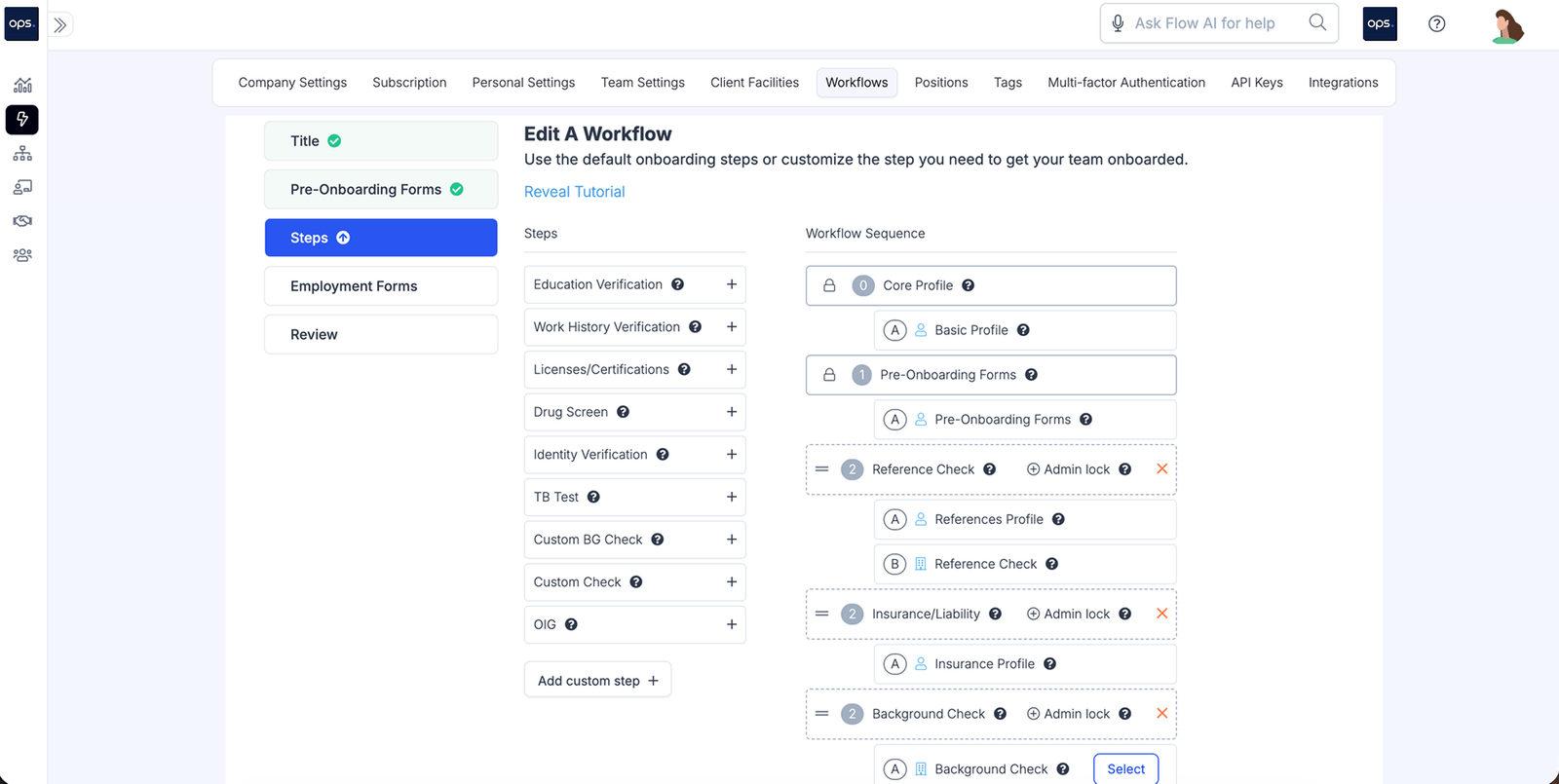
Templates or automation recipes are an important project management tool that outline the steps in a workflow process. A workflow solution that includes pre-built templates makes planning easier and reduces the time it takes to create task flows from scratch.
Ops.work has a number of prebuilt templates that you can modify to match your organization's processes. You can also use our free Jotform integration to access more free workflow templates or use our custom workflow builder to create your standardized workflows from scratch.
Here's an example of a credentialing workflow on our platform:
Notifications and Reminders
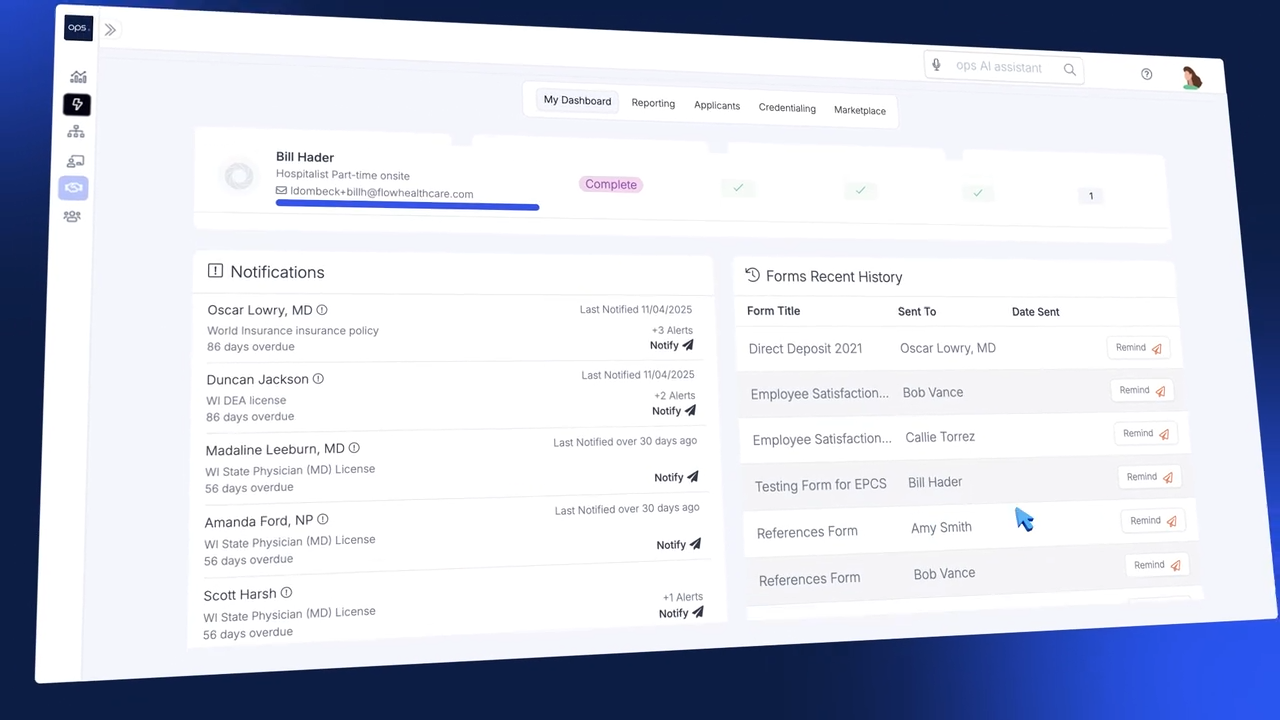
Roles and responsibilities change as data flows from one workflow sequence to the next. As this happens, a good workflow software should send notifications to the responsible parties to complete their tasks.
Workflows that include deadlines in their rules should also be able to send reminders to employees to nudge them to complete the task on time.
Ops.work has both reminders and notification features that ensure your employees know when a task is in their tray and sends reminders for prompt task completion.
Integration Capabilities
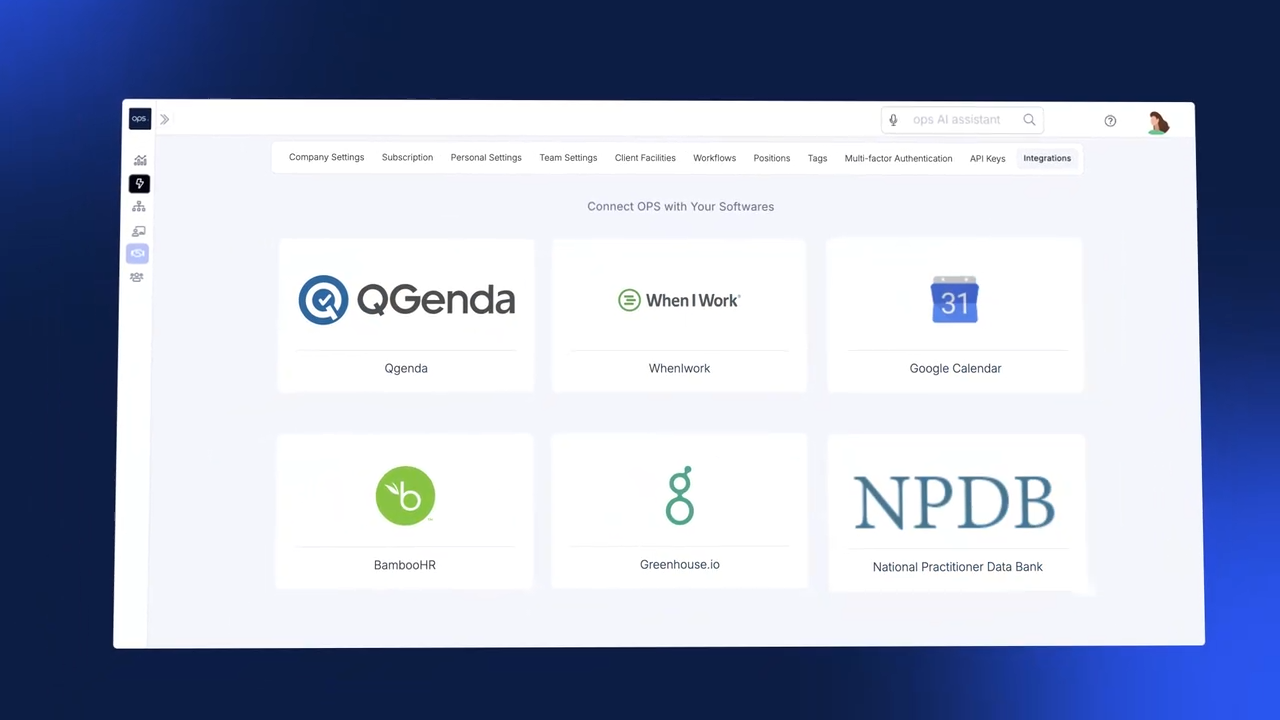
Automation is a key part of business process management. When these processes are housed in different systems, data silos arise. One way to eliminate data silos is to integrate your systems using business automation tools like ops.work.
Our tool provides integrations with other systems through low-code tools such as Zapier and Make. These integrations enable data to flow across systems, improving efficiency, especially for complex workflows.
Some of the systems you can integrate with your workflow automation management tool include EHR, HRIS, payroll, and IT systems.
Analytics and Reporting
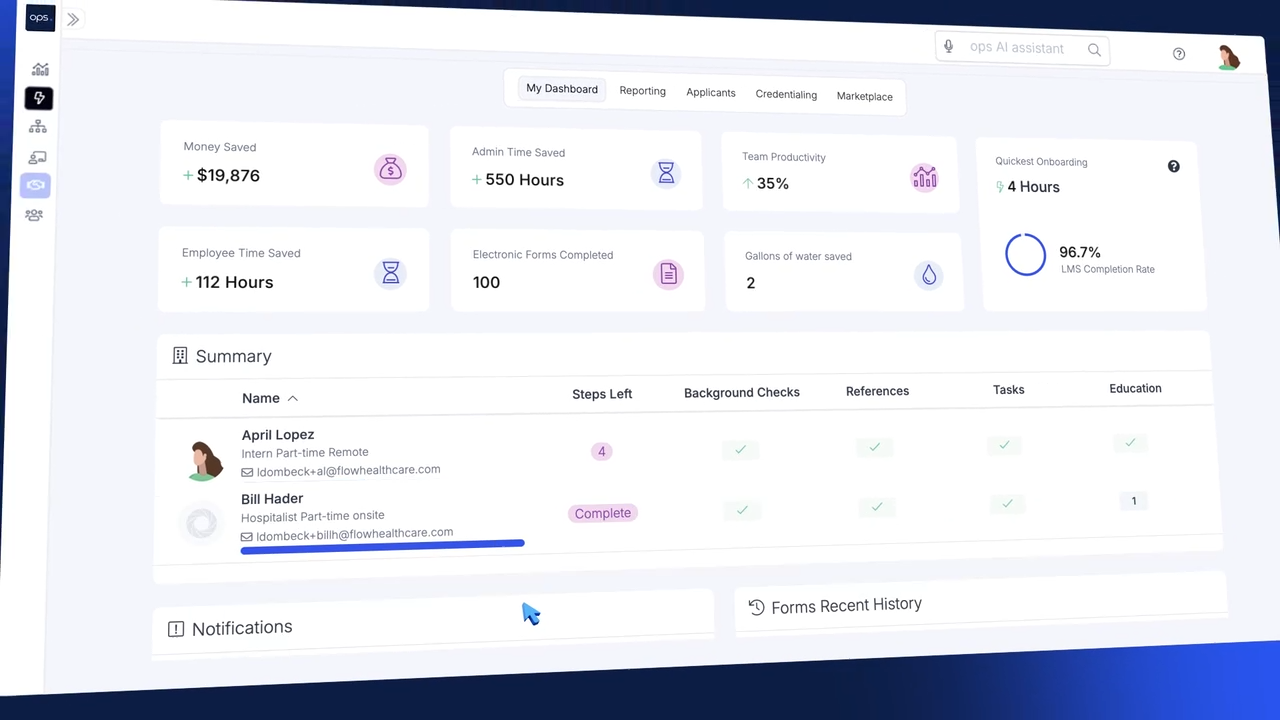
Collecting and analysing data about your workflows is key to making data-driven decisions to identify and address workflow inefficiencies. Analytics also help you identify the progress teams and employees are making towards meeting business goals.
By tracking metrics such as:
- Cycle time (the time it takes to complete workflow tasks)
- Throughput (the rate of completion in a given timeframe)
- Mean time to recovery (how fast does the workflow recover after failure
- Success and error rate
Your automation tool should also generate reports. Ops.work offers customizable dashboards and reporting features that let you track various operational metrics.
Transparent Pricing
Pricing is an important consideration when choosing the right workflow automation software, especially for small and medium-sized healthcare facilities. Understanding workflow automation platform pricing allows you to budget and choose a solution that fits within your budget.
Software may be priced using different models, such as:
- Cost per user per month
- Tiered pricing based on either the type of features offered or the number of users on your platform.
- Custom pricing, usually for a large organization
In addition to monthly or annual pricing, workflow automation solutions may incur additional costs, such as setup fees, training, additional integrations, and premium support charges.
Ops.work has two pricing tiers: a free plan for up to 10 employees and a paid plan for $50/month for 11-500 employees.
Conclusion
Workflow automation improves manual processes in paperwork-heavy industries such as healthcare, therefore improving efficiency, reducing errors, and saving time. Workflow automation also enhances compliance. Automation takes internal and external standards and turns them into actionable steps to guide your processes. Ops.work handles all things automation, making your internal process efficient. Get started with our free plan.
References
Obalannavar, Akhilesh, et al. “Smarter Business Processes with Data-Driven Automation.” Procedia Computer Science, vol. 274, 2025, pp. 845–856, https://doi.org/10.1016/j.procs.2025.12.083.
Reijers, Hajo A. Design and Control of Workflow Processes: Business Process Management for the Service Industry. Berlin; New York, Springer, 2003.
Cabán, Teresa Zayas, et al. “Identifying Opportunities for Workflow Automation in Health Care: Lessons Learned from Other Industries.” Applied Clinical Informatics, vol. 12, no. 3, 1 May 2021, pp. 686–697, www.ncbi.nlm.nih.gov/pmc/articles/PMC8318703/, https://doi.org/10.1055/s-0041-1731744.
Frequently Asked Questions
Workflow automation refers to the use of software to streamline repetitive tasks, reduce errors, improve efficiency, and enhance team performance. On the other hand, Robotic Process Automation (RPA) is the use of software to execute repetitive, rule-based tasks, such as data entry.
AI assistant tools can enhance workflow automation by facilitating database queries, unstructured data analysis, content categorization, and faster document processing.
Zapier and Make are popular tools that help teams automate their workflows through integrations with various software tools.
Many industries apply automation to improve their processes. Examples of workflow automations include employee and patient onboarding, performance reviews, patient intake, and appointment scheduling.