
Task management involves planning, prioritizing, assigning, and tracking tasks that contribute to larger projects. Effective task management software automates these processes, aiding in task planning, creation, and prioritization while improving collaboration and productivity. Ops.work offers task templates, customizable workflows, and integration capabilities with other tools, emphasizing data security compliance.
Key Takeaways
- Teams perform better with clear project goals, defined responsibilities, and timelines
- Task management enhances collaboration, accountability, and transparency, improving productivity
- Ops.work offers task management features, including workflow customization, progress tracking, and notifications to ensure timely task completion
Teams and employees perform better when they know what they are working towards, who is responsible for what part of the project, and the timelines for each task. For managers, it allows better delegation of tasks, giving employees autonomy in their jobs while freeing you to focus on what matters.
What is Task Management and Why Does it Matter
Task management is a crucial component of project management and employee performance management. It focuses on planning, creating, prioritizing, assigning, and tracking individual tasks that contribute to larger projects.
Task management goes beyond creating to-do lists. It involves providing clarity around tasks by ensuring they have all the necessary requirements for efficient execution. These components include:
- A title that describes the goal of the task, for example, onboarding front office staff
- A description of the task, providing the details that an employee needs to complete it
- The task timeline, including the start and due dates
- Responsibilities which define the task owner and assignees
- Task dependencies describe how the task fits with other tasks.
- Priority, which defines the order in which to complete tasks
- The task status, which allows you to track task progress
- Resources which provide additional information that may be useful when completing the task
Task management helps teams collaborate efficiently. It also creates clarity around individual and team responsibilities, which in turn improves productivity, accountability, and transparency.
When it's incorporated into your project management workflows, team members can discuss objectives, problems, and come up with solutions. This improves decision-making while ensuring teams and companies complete projects on time.
What are the Benefits of Using Task Management Software?
One of the benefits of task management is improving team performance. Therefore, many performance management systems incorporate the functionalities of task management tools into one tool. This enables managers to create workflows and task lists, allowing them to stay on top of tasks and projects.
Task management systems automate manual tasks, making it easier for task managers to track and manage tasks, keeping everyone on the same page. Here's how task management software helps your team:
It facilitates task planning, which involves identifying, organizing, assigning, and scheduling tasks. During this process, managers and team leads:
- Identify the overarching goal that the task will achieve
- Allocate the required resources and skill sets to complete the task
- Create workflows and processes that shape the priority or order in which teams complete related tasks
- Schedule the tasks in productivity tools like Google Calendar and assign them to team members
The software also facilitates task creation. A task is the smallest unit of work that is actionable, time-bound, assignable, and targeted towards a specific goal. An example of a task is: Submit documents for credentialing. Some tasks can be divided further into subtasks,
Ops.work is a task management software solution that allows you to create tasks with our built-in task templates.
You can also create templates for recurring tasks for future reference. Such templates list tasks in a simple outline, making it easier for teams to complete the right tasks.
Once created, it allows you to assign tasks to employees based on various rules such as their department, skill set, and expertise level.
These tools also facilitate task prioritization, which involves ranking tasks by their urgency or importance. For this step, managers use a variety of tools and approaches. The common ones include to-dos, Kanban task boards, and Gantt charts.
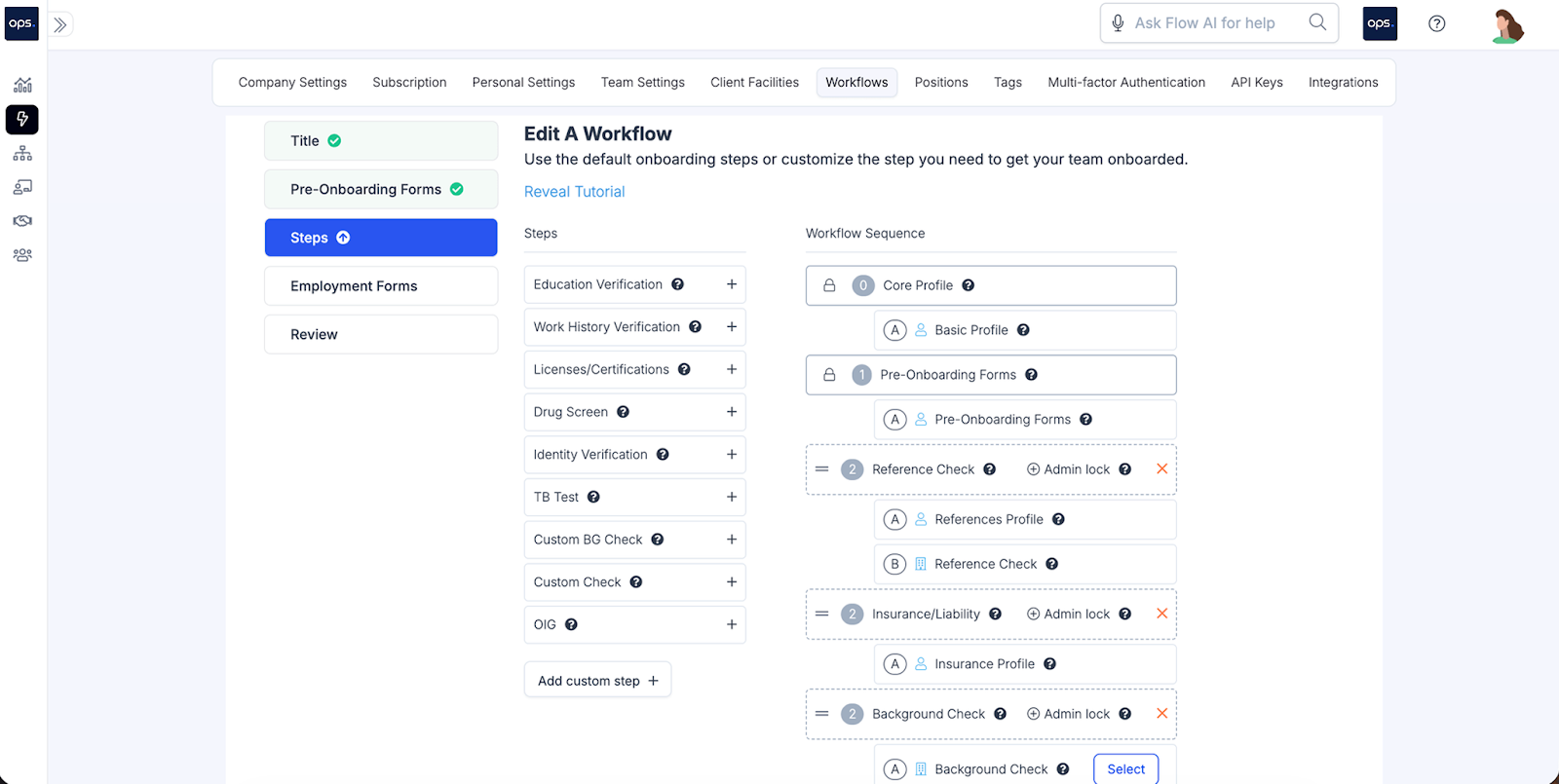
Ops.work takes prioritization a step further by allowing you to customize workflows that define task sequences. This can make it easier for teams to complete recurring tasks, such as onboarding new employees and training. Here’s an example of a workflow:
Most employee management solutions integrate some of these task visualization tools to help individuals or teams plan effectively for enhanced productivity and team collaboration.
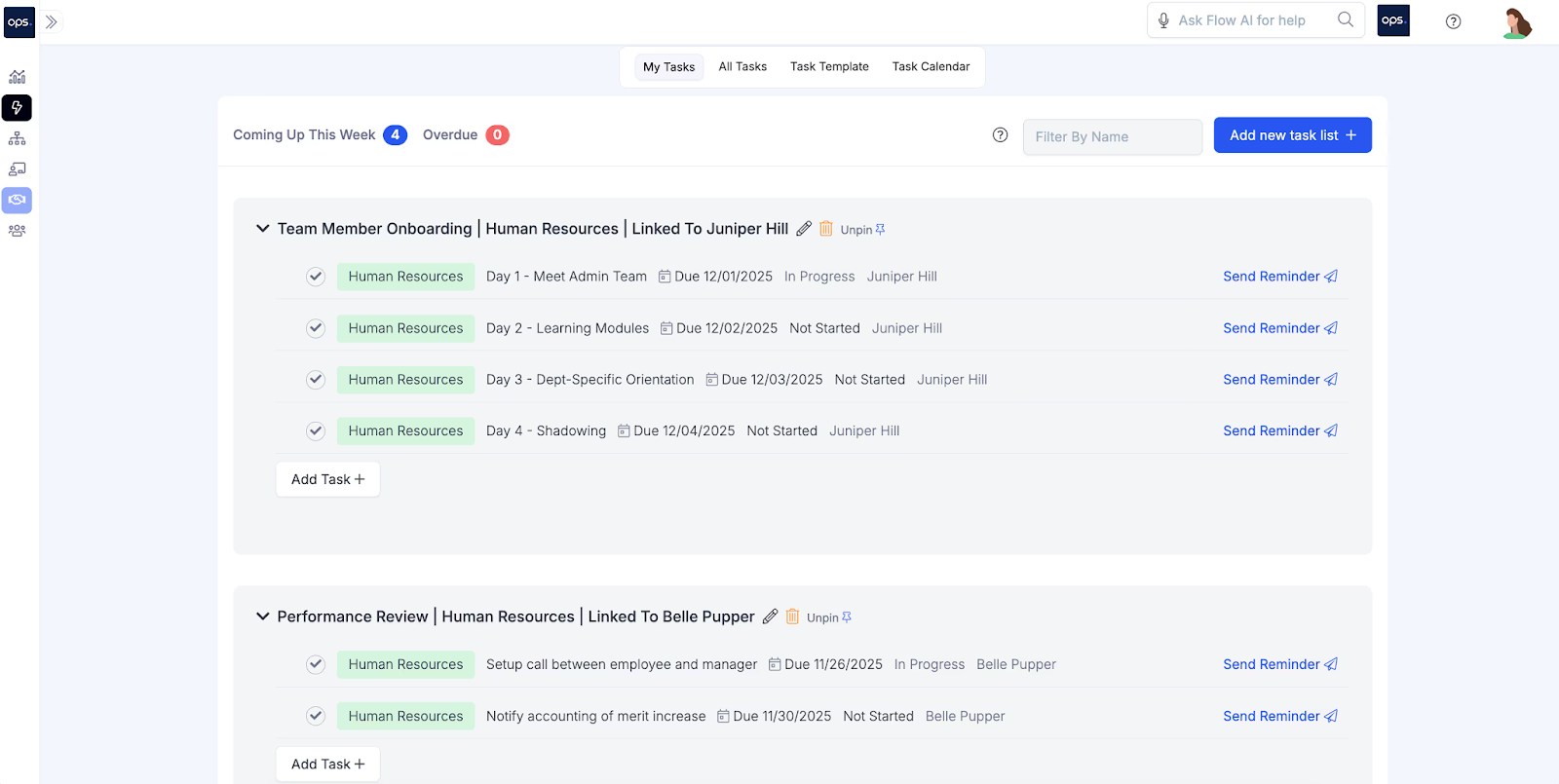
Work management tools also help with task tracking, allowing you to track the progress of each task. Ops.work tracks progress and sends notifications and reminders to managers and employees. This ensures all tasks are completed in time. Sign up for our free plan to get started.
What are the Key Features To Look For In a Team Task Management Platform?
There's a range of paid and free task management tools available in the market. With a range of task management apps and software to choose from, your organizational goals, needs, and environment determine the best task management software for you.
Data security is a necessary consideration for healthcare facilities, especially when tasks involve handling sensitive employee or patient data. The tools you use must be HIPAA-compliant and meet cybersecurity standards. Ops.work is compliant with various cybersecurity best practices, including HIPAA, ISO 27001, and SOC 2 Type II.
Choose task management software that integrates with other business tools. Integrations provide added functionality and enhance team collaboration. Ops.work supports integrations with other tools through Zapier, Make, and Webhook.
Through this, you can connect your team management platform with collaboration tools such as Microsoft teams and productivity apps like Google Sheets, Google Calendar, and Google Drive.
Choose a cloud-based task management solution that allows you to sync tasks across multiple devices. Such a tool allows all team members to view all the tasks assigned to them.
Conclusion
Companies that want to enhance productivity need to manage the tasks their employees perform. Ops.work is a management tool that gives your team features like task management and reporting capabilities to help you keep your team productive and engaged. The tool gives your onsite and remote teams a way to manage their roles and responsibilities by breaking them down into single tasks. Get started for free.
References
Lane, Jacqueline N, et al. “Teams in the Digital Workplace: Technology’s Role for Communication, Collaboration, and Performance.” Small Group Research, vol. 55, no. 1, 2023. SagePub, https://doi.org/10.1177/10464964231200015.
Miah, Md Alamgir, et al. Comparative Analysis of Project Management Software: Functionality, Usability, and Integration for Modern Workflows. 1 July 2025, www.researchgate.net/publication/393254870_Comparative_Analysis_of_Project_Management_Software_Functionality_Usability_and_Integration_for_Modern_Workflows.
Chaabouni, Mouna, et al. “A Framework for Project Management Software Tool Selection.” Procedia Computer Science, vol. 239, 2024, pp. 291–298, https://doi.org/10.1016/j.procs.2024.06.174.
Frequently Asked Questions
1/3/5 is a task prioritization system used alongside to-do lists. It suggests focusing on 1 major task, 3 medium tasks, and 5 small tasks.
Task management is an ongoing daily function which focuses on the smallest activities of a project. Project management, on the other hand, is temporary and focuses on project planning, resource allocation, task assignment, monitoring, and reporting. Companies often use project management software and tools when they have large projects.
Prioritization, poor time management, and communication breakdowns are the common problems in organizing tasks. You can prevent them by adopting best practices, such as time tracking for efficient time allocation, real-time communication tools, and automation tools to simplify manual processes. These include progress tracker tools and task visualization tools, like Gantt charts and Kanban boards.